OCR vs. ICR: Choosing the Right Document Recognition Technology
Businesses continuously manage a large volume of paper documents and seek ways to organize them for business processes. Paper documents remain a challenge for companies of all sizes. Whether you need to process handwritten applications or deal with thousands of printed invoices, manual data entry takes too much time and brings extra risks of mistakes.
That is why many organizations use OCR services to facilitate their workflow and improve efficiency. However, choosing between OCR and ICR is difficult for some people. While the two digitization recognition tools share similarities, they also have some considerable differences.
Understanding the tools' definitions is important, but their differences in functionality and advantages need to be assessed against your needs to make an informed choice. According to the report, document processing automation can increase an organization's overall productivity. This blog will discuss the meaning of OCR and ICR, compare their capabilities and advantages, and help you decide whether you should use the OCR or the ICR service.
OCR and ICR Overview
First, let us consider OCR vs ICR technologies, define their full form, and describe their key capabilities.
OCR and ICR Full Form
The full form of OCR is Optical Character Recognition.
The full form of ICR is Intelligent Character Recognition.
OCR and ICR have one major goal: to convert documents into editable electronic files. But there are some key differences between these two tools.
OCR and ICR Definition
OCR digitizes printed or typed text. OCR software scans documents, recognizes and extracts characters, and converts them into data a computer can read.
ICR is a modified version of OCR. The main benefit is that it can recognize handwritten characters and improve itself by analyzing patterns and using machine learning algorithms. So, OCR is usually efficient at recognizing printed text, and ICR works well with handwritten text.
What Is OCR?
OCR, or Optical Character Recognition, is a well-established technology used across industries worldwide. OCR software helps scan documents such as invoices, reports, contracts, and forms and recognize printed text.
Then it converts the identified data to an accurate digital format, allowing it to be edited and stored electronically. Some common uses of OCR software include:
- Management of customer data.
- Book scanning.
- Processing of invoices and receipts.
- Digitizing and storing documents.
Organizations that primarily work with printed documents are likely to use OCR services to boost efficiency. Also, OCR scanning helps legal firms manage documents efficiently for further processes.
What Is ICR?
ICR, or Intelligent Character Recognition, is based on OCR and can recognize both printed and handwritten text. ICR recognizes writing patterns to become smarter over time. So, it is beneficial for processing handwriting information on claims forms, applications, survey questions, and other types of documents.
Some common uses of ICR include:
- Collecting customers' opinions.
- Dealing with government forms.
- Analyzing bank applications.
- Managing medical records.
- Processing insurance claim forms.
Because handwriting differs from person to person, ICR is slightly more complex than OCR.
How To Make The Right Choice Between OCR and ICR?
To determine which tool would be more advantageous for your organization, compare them to understand the differences between OCR and ICR.
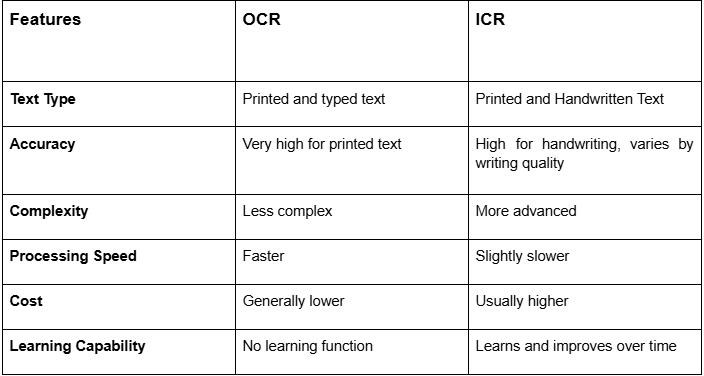
When the documents contain mostly printed text, OCR technology might suit you well, given its lower cost. Otherwise, ICR will probably work better, though it requires greater investment.
Real Life Case Study: Claim Forms Processing
One regional insurance company encountered issues processing thousands of claim forms each month. Since the forms included handwritten information such as addresses and customers' names, the company had no alternative but to fill them out manually.
Initially, the firm ordered the implementation of OCR technology. As a result, all printed parts of the documents were successfully recognized, but handwritten data could not be recognized with OCR.
Eventually, the company decided to try an ICR service that automatically analyzed handwritten data, greatly reducing processing time.
How To Choose Between OCR and ICR
To decide between OCR and ICR, it is necessary to understand the document type and the company’s needs and priorities.
Choose OCR Technology When:
- The budget is limited.
- Your main priority is processing speed.
- You primarily work with printed documents.
- You deal with high volumes of documents.
Select ICR Technology When:
- Your organization regularly processes applications, forms, and surveys.
- High precision in recognizing handwritten data is needed.
- Your employees experience trouble with data entry due to the large amount of handwritten data.
- Your document includes some handwritten information.
Many businesses use both OCR and ICR simultaneously to eliminate manual document processing.
Increase The Document Processing Capabilities By Making The Right Choice
A detailed understanding of the distinguishing features of OCR and ICR should be the primary factor in choosing the document recognition method. The use of OCR proves an effective solution for processing printed text, delivering fast, highly accurate results. But other capabilities available with ICR allow one to handle handwriting.
For those wondering which is better, OCR vs ICR, the best solution will depend on the type of document the company handles. Companies that process mainly printed documents can use traditional OCR services and OCR scanning services, but for those dealing with handwritten documents, ICR is better.
